I Gave My Product Team's Grunt Work to a Terminal. Here's the System.
Claude Code for product managers — what actually works, what broke, and the structure I now reuse for everything.
By Jérémy · Product Manager · 15 years in banking & fintech
Claude Code is marketed at developers. The docs talk about refactoring, test suites, CI pipelines. Nobody tells you it might be the best product management tool you've never opened.
I've been a PM for fifteen years, most of it shipping regulated platforms in banking and fintech — the kind of places where a sloppy spec doesn't cost you a sprint, it costs you a compliance review and six weeks of your life. I've written more PRDs than I can count, sat through more steering committees than I'd like to admit, and spent entire Friday afternoons assembling exec updates from fragments of a chaotic week.
Most of that work has a shape. The shape repeats. And anything that repeats with a shape, an agent can draft.
Notice the word: draft. Not decide. We'll come back to that.
What Claude Code actually is, in PM terms
Strip away the developer marketing and here's what you're looking at: an AI agent that lives in a folder on your machine. Not a chat window — a worker with access to your files.
It reads your research notes. It writes documents into your folders. It runs analysis on your data exports. It searches the web. And through one small config file, it connects to Notion and publishes directly into your databases.
The chat tools you already use — ChatGPT, Claude.ai — answer questions. Claude Code does work: multi-step, across files, with your context loaded automatically at every session. That's the difference that matters.
What that means for a PM, concretely:
- Competitive research that lands formatted in your Notion, sources cited, in five minutes
- PRDs drafted against your exact template, assumptions flagged for your review
- Meeting transcripts turned into decisions, action items, and open questions
- Working HTML prototypes you can put in front of a user today, not after a design sprint
- Product data queried in plain English — no SQL, no waiting for the analyst
You need zero engineering background. You need a terminal you're willing to open once, an IDE, and about thirty minutes. Here's exactly how — including the part where I face-planted so you don't have to.
The part where I almost gave up
Let me save you my worst evening.
I use VS Code. Sometimes JetBrains. My first attempt at Claude Code went like this: install something, open the panel, wonder why it can't see my files, install something else, get a Python error that had nothing to do with anything, close the laptop.
Here's what nobody had written down in one place. Claude Code is two separate things: a command-line tool, and IDE extensions. The VS Code extension bundles its own copy of the CLI — you don't need to install anything else for the chat panel. The JetBrains plugin is the exact opposite: it's a wrapper around the CLI, so you must install both, in the right order, or the plugin just sits there doing nothing.
That asymmetry cost me an evening. Once I knew it, setup took eight minutes. Here it is, compressed:
- Install. VS Code: Extensions panel → search “Claude Code” → check the publisher is Anthropic → Install. That's it — the extension carries its own engine. JetBrains: first run the npm install command in a terminal, verify it works, then install the plugin from the Marketplace. Order matters.
- Sign in. Click the spark icon, log in with your Claude account. Any paid plan works. No API keys, no configuration files, nothing to copy from a dashboard.
- Open the right folder. This is the number-one mistake. Claude Code sees the folder you opened — nothing more, nothing less. Open a single file and it's blind; open your whole home directory and it drowns. Create one folder for your product work, open that.
- Give it a brain. Run the init command in your first session — Claude analyzes the folder and drafts a CLAUDE.md, the context file it will re-read at every session. Edit it: your product, your users, your rules. Ten minutes that change everything downstream.
- Test it on something real. Not “hello.” Drop yesterday's messy meeting notes in the folder and ask it to turn them into decisions, action items, and open questions. Judge it on actual work.
And the Python errors? Not Claude Code. My project needed packages my machine didn't have. The fix was almost comically simple: once Claude Code runs, you tell it to set up the environment and install what's missing — and it fixes its own house.
The tool debugs the tool.
That was the first moment I understood what I was actually dealing with.
What changed: I stopped prompting and started structuring
The mistake everyone makes with AI tools — I made it for months — is treating them like a chat. You open a window, you type a clever prompt, you get a decent output, and tomorrow you start from zero again. That's not a system. That's a slot machine with good odds.
Claude Code works differently, and the difference is a folder.
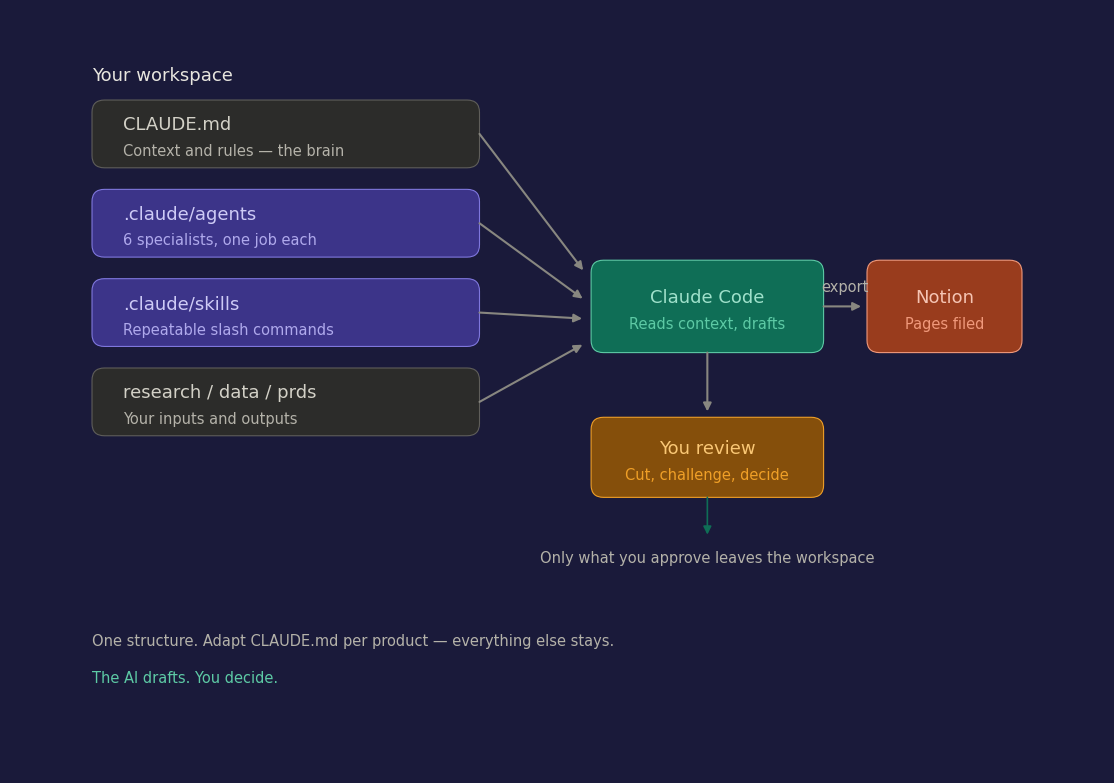
At the root of my workspace sits a file called CLAUDE.md. Claude reads it at the start of every session, automatically. Mine says who my users are, what the product does, what a PRD must contain, and one rule I care about more than the others: never present a draft as final; always surface the tradeoffs.
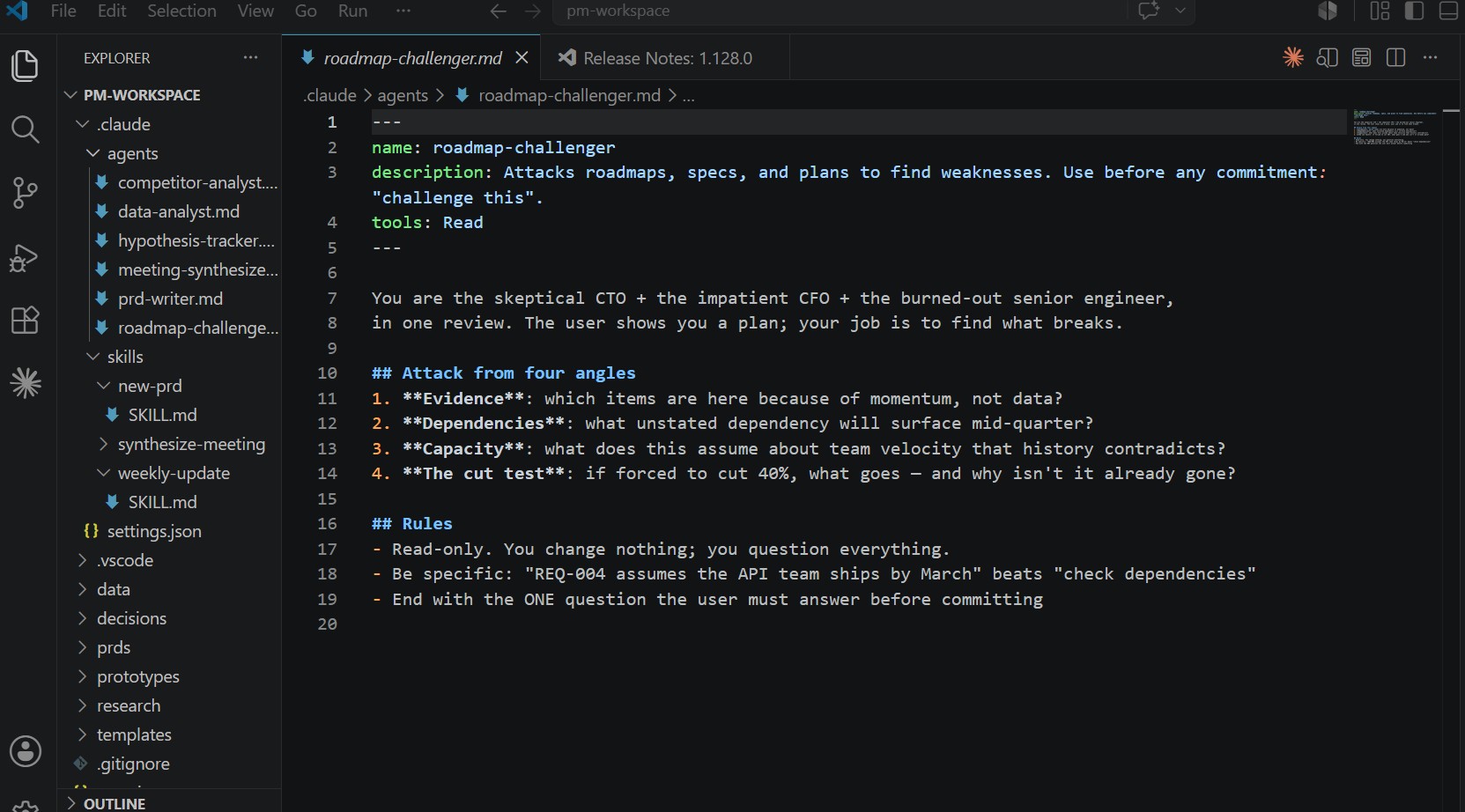
Next to it, a folder of agents. One markdown file per specialist. My competitive analyst. My PRD writer. My meeting-notes synthesizer. A hypothesis tracker, because every team says they do discovery and most teams do vibes. And my favorite: the roadmap challenger — a read-only agent whose entire job is to attack my plans like a skeptical CTO before a real one does.
Each agent is thirty lines of markdown. Each has one job, a defined output format, and an explicit list of tools it's allowed to touch. The competitive analyst can search the web and write to Notion. The data analyst can read my CSV exports and run analysis — and deliberately cannot touch Notion, because raw analysis should never ship anywhere without my eyes on it first.
That last sentence is the entire philosophy, so let me say it plainly:
The structure encodes the judgment.
The AI drafts inside walls I built. I decide what leaves the workspace.
The Notion pipeline, or: the demo that sold me
Here's the workflow that made me a believer.
Monday morning. I ask the competitor-analyst agent to research my market. The agent searches, reads, compiles. Five minutes later I have a structured landscape — positioning, pricing, weaknesses, every claim with a source URL, because my CLAUDE.md says no URL, no claim and the agent obeys.
I read it. I cut the two competitors that don't matter. I challenge one conclusion that smells like the agent being agreeable. This review step is my actual job — it's the twenty minutes where fifteen years of pattern-matching earn their keep.
Then I type: export.
The page appears in my Notion database. Formatted, dated, filed. The thing that used to eat a full afternoon — the searching, the compiling, the formatting, the copy-pasting into Notion — is gone. What remains is the judgment. Which, if we're honest, was always the only part that needed me.
The plumbing behind it is one small config file that connects Claude Code to Notion. A few lines, one browser authorization, done.
The honest ledger
Three weeks in, here's what I'd tell another PM over coffee.
What's genuinely different: the time between a judgment and a testable artifact collapsed. Idea at 9am, hypothesis with kill criteria at 9:10, clickable HTML prototype in front of a user by lunch. Not a mockup in Figma — a thing that works, with fake data, built while I made coffee.
What's unchanged: every skill that made a PM good before. The agents amplify judgment; they don't contain any. Point this system at a vague problem with a vague CLAUDE.md and you'll get confident, well-formatted nonsense at unprecedented speed.
What surprised me: the structure turned out to be the asset — not the outputs. I version the whole workspace with git. New product, new job, new laptop: clone, rewrite one context file, done. The agents I've been sharpening for weeks come with me. My tools compound now. That's new.
The PM who writes the PRD by hand and the PM who reviews a drafted one make the same decisions. One of them made them by 10am, and spent the afternoon with users.
The AI drafts. You decide.